Email Phishing
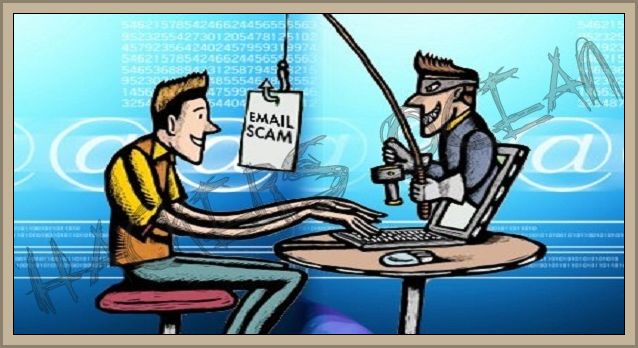
Bank email phishing is a common method that hackers use to acquire personal information from online user’s accounts.
If you receive an email that looks like it’s coming from your bank, from MasterCard
or Visa, DO NOT click on any links until you call your bank or credit card provider about the message.
This weekend another processor data breach was reported by Global Payments Inc.
Global Payments Inc. who is a processor of Visa and MasterCard transactions, reported being hacked and that an estimated 1.5 million North American bank card users had been
affected.
As I stated in previous posts, anyone can be hacked for any reason.
In this particular instance, the data that was stolen appears to be names, credit card numbers, validation codes and enough personal information for hackers to clone a credit card and take over an individual’s identity.
If you have been affected by the hack, you will be contacted by your bank and be issued a
new credit card and account number.
Unfortunately, phishers take advantage of people who are concerned that their accounts were affected, by sending them emails requesting personal credit card data to “update” their account information.
When these situations occur, many people anxious about their credit card accounts will eagerly give up their information without first checking with their providers.
Bank email phishing opportunities will continue to occur as hackers refine their techniques and as they make the news, you can count on phishers to be on your doorstep trying to take advantage of the situation.
When you suspect an irregularity in your credit card statement or think your personal information has been compromised and your bank has not already contacted you by phone, call them directly to check on the discrepancy.
Do not reply to any bank email query. Call them if you have not been officially notified and reference the email.
When Global Payments Inc. reported the number of credit card accounts were affected, they did not specify the number of transactions that could have been compromised.
This number is probably much higher than what was actually reported.
So far the cause of Global Payments’ breach has not been identified however, some believe that the breach was caused by improper employee security that may have lead to a malware insertion in their network.
Although this is just speculation, the main causes of hacks with U.S. companies is negligence and malicious malware attacks.
Although there is nothing you can do about a third party payment processor, you can take steps to keep your personal computer safe.
Phishers flood email accounts with messages that look like they are being sent from your bank but your bank will never ask you for your username and password.
Use common sense when opening your emails.
You can keep your transactions on the web more private by creating an isolated desktop.
An isolated desktop prevents other applications from running and “seeing whats happening” when you are working with sensitive transactions.
For secure shopping, stock trading and banking transactions, this is a perfect solution.
Several antivirus programs are available online that provide this feature.
Avast antivirus among others has a free download available and several others offer a free trial period that allow you to test their programs.
Although bank email phishing opportunities will probably never be totally eliminated, you can reduce their effectiveness by understanding how bank email phishing works and what steps can be taken to recognize and prevent it from happening to you.

 Although hacking and phishing both seek to steal information from individuals, because of how the information is acquired, they are not the same thing.
Phishing is the process of getting information from a user by creating a fake website that looks identical to the original site, with a log in form.
Basically, phishing is a type of Internet fraud that tries to acquire a user’s credentials by some sort of deception.
Phishing can include the theft of passwords, bank account details, credit card numbers, and other types of sensitive private information.
When a user gets tricked into providing their username and password on the fake website, their user information is sent directly to the phisher’s database or email address where they can then gain access to the users original website to steal whatever else they can from the user.
Phishing scams are rampant online, especially against email providers, banks, eBay and PayPal account holders.
Phishers will often try to frighten a recipient into giving them information by emailing them an ostensibly important reason for them to divulge their personal data.
Fear is a great motivator.
When a recipient receives a message that contains a threat to block their account if they do not update their personal information immediately, many recipients will eagerly comply with the request.
Users often receive fake email notifications that appear to be sent from the email provider’s customer care department, to log in and “verify” their email address.
If the user is in a hurry or is a novice to phishing, they may not recognize the fact that the URL is not actually from their email provider’s customer care department.
When they fill out and click on the fraudulent “verification” form using their username and password, they are actually sending the phisher their sign in information.
Hacking on the other hand, is the process where a “hacker” steals information from users by either actually hacking into a system’s database using different word combinations or by installing “key” recorders or dialers on a users computer.
For this reason alone you should change your login passwords at least every 30 days and use long passwords with numbers, upper and lower case letters and other keyboard characters included in the mix.
Once a key recorder or key logger is installed on a users computer, it immediately begins collecting pertinent information from the computer and transmits it to the hacker’s data base or email address.
Key loggers will collect every password stored on a users computer, every URL that a user visits, screenshots and just about anything else that the hacker needs to conduct their illegal activities.
Hacking and phishing attacks can be targeted or completely random.
Ebay, PayPal and banks from all around the world are the most popular phishing targets.
Unfortunately identity theft is not the only threat to users.
If you are connected to the Internet; injected Trojan programs, key loggers, malware and spyware programs can infect anyone’s computer so even if your do not have an eBay, PayPal or bank account online, you can still be targeted by hacking and phishing fraudsters.

Optimize Your Images For Search
Here are some simple steps you can take to optimize your images for search, ensure that your images are search engine ready and ultimately improve the rankings of your images with the search engines.
- Provide A Descriptive File Name
Image file names provide very specific information to both your visitors and the search engines about the topic of your image.
The keywords you use in the file name of your image should be more specific than DSCN6418 or img34.jpg.
A more descriptive file name such as Siamese_Cat.jpg, SpottedSeaTrout.jpg or Albino_Loggerhead_Turtle.gif is preferable and more useful to your users..
- Provide A Descriptive Caption
Whenever possible try to provide a descriptive text caption to more fully describe your images.
A descriptive caption will help the search engines associate your image with the keywords you used in the text content surrounding the image.
- Link Your Images For Higher Page Ranking
You can improve your PR and assist the search engine spiders crawl your page content by linking to your image from other pages or to the page that the image is imbedded on.
Linking pages with a higher PR to your image will ultimately result in improving your PR.
- Using Descriptive Alt Text
There are many situations where an image will not be shown in a browser, such as when a visually impaired person must use a screen reader of when people must use low bandwidth Internet connections.
In these situations you can help the search engines improve usability by adding descriptive alt text content to the image alt attribute.
This helps the search engines determine the best image to retrieve for a user’s specific search query.
SEO your alt text by using descriptive keywords in the alt text but DO NOT add a long string of keywords.
All this does is flag your image to the search engines as a potential spam site and dilute the usefulness of the alt text.
Keyword stuffing is always a definite NO NO.
If you are writing about Tarpon fishing in the Florida Keys and are using an image of an angler battling a tarpon, your keywords should be focused on exactly what the image depicts.
Focused keywords like “Tarpon Fishing in Key West, Florida” is preferable to “Florida Saltwater Fishing”.
- Adding Image Specific Tags To Your Sitemap
If you are having problems getting your images indexed by Google, you can always add image specific tags to your sitemap.
Specific image tags tell Google which images are more important to you on your site.
If you don’t already have a sitemap, you can create one manually or use one of the many third-party tools that are available online to help you generate your sitemap.
You can add your image information to an existing Sitemap or create a separate image Sitemap to list your images.
Both methods work equally well.
If you don’t already have a Sitemap for your website, create one now.
As you can see it really doesn’t take a great deal of extra effort to optimize your images for search so why not do it?